

April 22, 2026
Announcing Rspack 2.0

We are excited to announce the official release of Rspack 2.0!
Looking back at 1.x
When we released Rspack 1.0 in August 2024, we set a clear goal: deliver a 10x performance improvement while staying compatible with the webpack API and ecosystem.
Looking back at the 1.x cycle, we have largely achieved that goal. Rspack not only implemented webpack's core capabilities and plugin APIs, but also kept evolving in developer experience, output optimization, and support for modern language features. Along the way, we introduced and refined incremental builds, lazy compilation, persistent cache, constant inlining, virtual modules, barrel file optimization, and more.
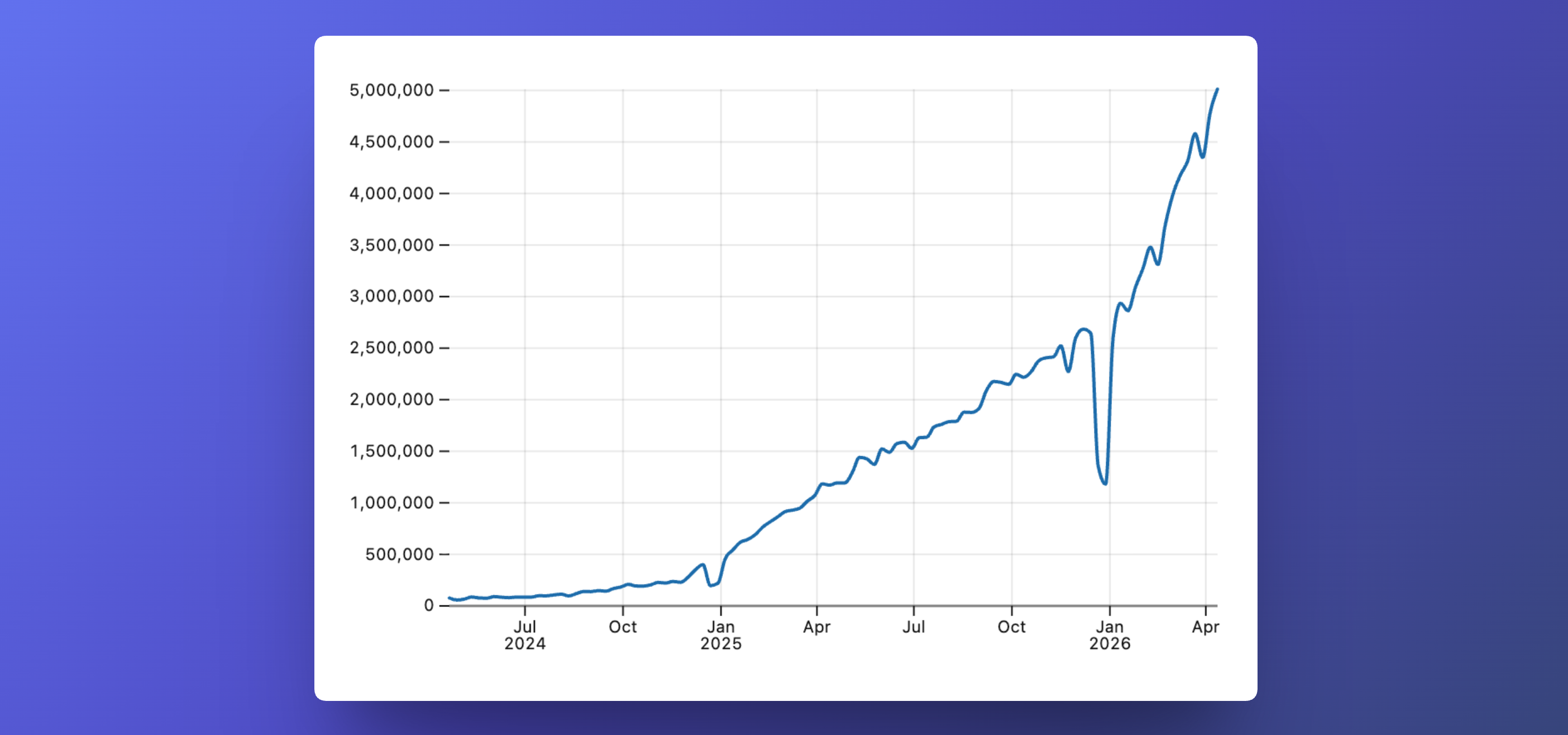
Rspack is also being adopted by a growing number of users. Compared with the 1.0 release, Rspack's weekly downloads have grown from 100,000 to 5 million:
We also built Rstack around Rspack, a unified JavaScript toolchain that includes Rsbuild, Rslib, Rstest, Rspress, Rsdoctor, and Rslint. These tools serve different use cases, but they share the same mission: making web development simpler, more consistent, and more efficient.
Rspack is also becoming part of the broader JavaScript ecosystem. Many excellent tools, frameworks, and platforms in the community now support Rspack, including Angular Rspack, Addfox, Docusaurus, Extension.js, ice.js, Lynx, Meteor, Modern.js, Next.js, Nuxt, Nx, Kmi, Re.Pack, Remotion, Shakapacker, Storybook, TanStack Router, Unplugin, Vize, xmcp, and Zephyr. We sincerely thank all of the community projects and teams that support Rspack.
Toward 2.0
The JavaScript ecosystem keeps evolving, and coding agents are also changing how software is built. This prompted us to rethink how a future-ready bundler should evolve.
Rspack's goal is not just to be a faster webpack. During the 1.x cycle, we intentionally aligned Rspack's APIs and defaults with webpack 5 to help existing projects migrate at minimal cost. But as JavaScript modules and the surrounding ecosystem continue to evolve, some historical design choices are no longer the right defaults for modern development.
Starting in 2.0, while remaining compatible with the webpack ecosystem, Rspack will gradually introduce defaults, API design choices, and build outputs that are better aligned with modern JavaScript development. We will roll out these changes in stages. We will avoid packing too many breaking changes into a single major release whenever possible, and we will provide migration guides and Agent Skills to keep migration costs manageable.
Highlights in 2.0
Rspack 2.0 brings the following updates:
- Performance improvements
- Output optimization
- Improved ESM support
- New features
Performance improvements
Faster builds
Build performance has always been one of Rspack's core priorities. Compared with Rspack 1.7, Rspack 2.0 improves overall performance by around 10%, and by as much as 100% compared with 1.0.
Data source: rspack-react-10k-benchmark
These improvements mainly come from continued optimization of the core architecture. We refactored parts of the algorithms and data structures on critical performance paths, upgraded outdated dependencies, and removed unused code paths.
With persistent cache enabled, both build performance and memory usage improve even further:
- Rspack now supports cache reuse for the SWC minimizer plugin. On cache hits, build performance improves by around 50%.
- With optimized underlying storage, memory usage drops by more than 20% when cache is enabled.
Fewer default dependencies
Rspack 2.0 reduces the number of npm dependencies installed by default:
@rspack/dev-server: dependency count reduced from 192 to 1.@rspack/core: dependency count reduced from 8 to 1.@rspack/cli: now has zero dependencies.
In Rspack 1.x, @rspack/dev-server pulled in many dependencies indirectly through webpack-dev-server, which increased the installation size and made dependency management more complex. To address this, we refactored it, streamlined its features and dependencies, and reduced the install size by more than 90% (from 15 MB to 1.4 MB).
At the same time, @rspack/cli no longer depends on @rspack/dev-server by default. That means if you only use rspack build, you no longer need to install dev-server-related dependencies.
We also reduced dependencies through the following changes:
- Moving non-core dependencies to optional dependencies. For example, @module-federation/runtime-tools now only needs to be installed when you use the ModuleFederationPlugin.
- Replacing heavier dependencies with lighter alternatives, such as using connect-next instead of Express. For dev servers, Connect's middleware model already covers most scenarios, and using it also keeps Rspack aligned with Rsbuild's dev server implementation.
- Bundling some dependencies into the npm package so that Rspack can control the versions of those dependencies and their transitive dependencies, reducing potential supply-chain risks caused by automatic upgrades.
- Preferring native Node.js 20+ APIs where possible, such as using styleText instead of
picocolors.
Output optimization
Better static analysis
Rspack 2.0 improves static analysis so that more complex code patterns can benefit from tree shaking. Some patterns that were previously difficult to analyze can now participate in export-level pruning.
- CommonJS
requiredestructuring: Rspack can now identify which exported members are actually used in a destructuring assignment and keep only the required code.
- CommonJS
requireproperty access and calls: Rspack can now further analyze property access and calls to determine which exports are used.
- Inline property access and calls on dynamic
import()results: When module members are accessed directly in the expression, Rspack can also identify the used exports and prune the rest.
Compiler annotation support
Rspack 2.0 now supports compiler annotations, allowing you to use #__NO_SIDE_EFFECTS__ to mark functions as side-effect-free. When the return value of such a function call is unused, tree shaking can automatically remove the unused code.
For example, in the following code, join is marked as side-effect-free. When its return value is not used, the call can be removed safely.
This feature is still experimental. Enable it with
experiments.pureFunctions. See the guide for more details.
For third-party modules whose source code you cannot modify directly, Rspack also lets you manually declare pure functions through the pureFunctions option to achieve the same effect.
Module Federation tree shaking
Rspack now supports tree shaking for shared dependencies in Module Federation. It can prune shared dependencies at the export level and remove unused parts, reducing the size of shared packages.
In Rspack 1.x, once a dependency was declared as shared, the runtime usually had to load the entire package. Even if only a few exports were used, the whole package would still be included. For large shared libraries, that could add significant overhead.
Rspack 2.0 adds treeShaking support to the shared option. When enabled, ModuleFederationPlugin generates a pruned build for the shared dependency and loads that result at runtime when possible. If it cannot be used, Rspack falls back to the full dependency to keep behavior consistent.
For example:
See the shared dependency tree shaking guide for more details.
Improved ESM support
Pure ESM packages
Rspack's core packages are now published as pure ESM packages, and their CommonJS builds have been removed. This makes module loading more consistent and better aligned with current Node.js practices.
This change affects the following npm packages:
In Node.js 20 and later, the runtime already supports loading ESM modules using require(esm). For most projects that still use Rspack through the JavaScript API, this change has little practical impact and does not require additional code changes.
Support for import.meta
Rspack 2.0 improves support for import.meta.
In Rspack 1.x, to support non-ESM output, Rspack resolved import.meta during compilation and replaced it with corresponding values. Unknown import.meta properties were usually replaced directly with undefined.
Starting in Rspack 2.0, when generating ESM output, Rspack preserves unknown import.meta properties by default instead of replacing them during compilation. This lets you use custom import.meta properties and makes the behavior closer to the ESM spec.
You can also control this behavior with module.parser.javascript.importMeta, for example:
Rspack 2.0 also adds support for import.meta.main, import.meta.filename, and import.meta.dirname.
Support for import defer
import defer is a JavaScript feature for deferring module evaluation, and it is also supported in TypeScript 5.9. It allows a module to be loaded without immediately evaluating it or its dependencies, giving you more control over when code runs and when side effects occur.
Rspack has supported the import defer * as foo from './foo' syntax since 1.6. In 2.0, we expanded that support to include import.defer(), allowing it to cover more real-world scenarios.
- Enable the experimental flag:
- Use
import.defer()to dynamically import a module:
Improved ESM library builds
When building JavaScript libraries, the quality of ESM output directly affects how well downstream tools can analyze and optimize it. Cleaner ESM output is usually better for static analysis, code splitting, and tree shaking.
In Rspack 2.0, you can set output.library.type to 'modern-module' to generate ESM output that is better suited for published libraries.
Compared with output.module, which targets general ESM output, modern-module is specifically optimized for library builds. It evolved from the experimental rspack.experiments.EsmLibraryPlugin introduced in Rspack 1.x and produces output that is easier for downstream tools to analyze and process. In code-splitting scenarios, it also preserves a cleaner ESM structure and reduces duplicated code in multi-entry builds.
In addition, modern-module supports preserving the source directory structure. See the ESM guide for details.
New features
React Server Components support
React Server Components (RSC) are becoming an important foundation for full-stack React frameworks. Rspack 2.0 now provides experimental low-level build support, including:
- Directive support: Supports
"use client"as well as module-level and function-level"use server"directives. - Compile-time checks: Detects React API usage that violates RSC rules during compilation, helping avoid runtime errors earlier.
- CSS support: Collects styles from server and client components during the build and injects them during rendering.
- HMR support: Supports hot updates for both server and client components.
You can use this capability in two ways:
- Use Rsbuild: We provide out-of-the-box RSC support through rsbuild-plugin-rsc.
- Configure Rspack manually: Refer to the React Server Components documentation to add the required configuration yourself.
Across the ecosystem, Modern.js already provides RSC support built on Rspack. See the Modern.js RSC documentation for details. Rspack also supports React Router's Data Mode, with examples available in the React Router examples.
We are also collaborating with the TanStack team and plan to support TanStack Start and TanStack RSC in future releases. TanStack Start is a full-stack framework built on TanStack Router, and we look forward to exploring more RSC possibilities together.
Support for #/ subpath alias imports
Rspack 2.0 supports #/ subpath alias imports during module resolution. This lets you use the imports field in package.json directly to organize internal path mappings, without maintaining a separate alias configuration.
Simplified target configuration
In Rspack 1.x, the top-level target option did not affect the transformation targets used by loaders or minifiers. As a result, you often had to configure target environments separately in loaders and minimizer plugins, which increased configuration overhead and duplicated the same information in multiple places.
Rspack 2.0 improves this behavior. Built-in loaders and minimizer plugins now read the top-level target configuration by default and infer their own target environments from it. In most cases, you only need to declare the target once at the top level to keep JavaScript transforms, CSS transforms, and minification aligned.
See target - Target inheritance for more details.
Simplified swc-loader configuration
In earlier versions, if you wanted builtin:swc-loader to handle .js, .jsx, .ts, .tsx, and similar files in a single rule, you had to explicitly set options such as syntax, jsx, and tsx in jsc.parser based on the file type. This ensured that SWC could parse each file with the correct semantics, such as deciding whether < should be treated as JSX syntax or a TypeScript generic.
That added extra configuration complexity. To make SWC parse files with different extensions correctly, you often needed multiple rules, which made the config longer and harder to maintain.
To solve this, Rspack 2.0 introduces the detectSyntax option in the built-in swc-loader. With detectSyntax: 'auto', the loader automatically infers parser options such as syntax, jsx, and tsx from the file extension. A single rule can now cover multiple file types, making the configuration much cleaner.
Control over CSS imports
Rspack 2.0's CSS parser provides the resolveImport option to control whether @import is resolved and inlined during the build.
By default, Rspack resolves @import and merges the imported content directly into the current file. You can also set resolveImport to false to preserve the original @import and leave it to the browser or downstream tools.
resolveImport also accepts a function, allowing you to decide whether each @import should be inlined. For example, you can inline only local CSS while leaving remote URLs as @import:
Use hashes as module IDs
Rspack 2.0 adds a new hashed option to optimization.moduleIds. When enabled, Rspack generates short, stable hashes from module paths and uses them as module IDs.
This is useful when you want module IDs to remain stable while also shortening them. For large applications with many modules, it can also help reduce the space they occupy in the output in some cases.
Improved code splitting
Rspack 2.0 now supports the splitChunks.enforceSizeThreshold option, which lets you define a size threshold that Rspack will enforce during code splitting.
By default, request-count limits in splitChunks, such as maxAsyncRequests and maxInitialRequests, can prevent large chunks from being split further. With enforceSizeThreshold enabled, once a module group exceeds the configured threshold, Rspack ignores those limits and forces the split.
In production mode, Rspack sets a default enforceSizeThreshold of 50000 bytes for all module types. In other modes, the default is 30000 bytes. You can also adjust it as needed:
This option can also be configured separately in cache groups, so different cache groups can use different thresholds.
Try 2.0
Create a new project
If you are trying Rspack for the first time, we recommend creating an Rsbuild project directly. It is an out-of-the-box build tool powered by Rspack:
See the Quick Start for more details.
Upgrade from v1
Rspack 2.0 includes some breaking changes. For existing projects, we provide an Upgrade Guide that covers all breaking changes from v1 to v2 and how to migrate them.
If you use a coding agent that supports Skills, you can install the following Skill and let the agent help with the migration. In most cases, this is more efficient than upgrading manually.
Looking ahead
Rspack 2.0 is a new starting point. In 2.0, we have already introduced some forward-looking design choices. Going forward, we will continue moving in these directions: improving output optimization and build performance, strengthening support for agents, and keeping up with new web platform capabilities.
- For output optimization, we will continue improving tree shaking, code splitting, and static analysis while providing fine-grained, controllable optimization options for different scenarios. We will also keep exploring more modern output formats.
- For performance, we care not only about the bundler itself, but also about the overall overhead introduced by related tools such as linters, type checkers, and Tailwind CSS. We will keep advancing the Rstack toolchain so performance improvements can cover more of the end-to-end build process.
- For AI integration, we will continue improving debugging, diagnostics, context collection, and issue reproduction workflows, helping AI understand and handle build problems more accurately and shortening the feedback loop between analysis, validation, and iteration.
FAQ
Will Rspack still be compatible with webpack after 2.0?
Yes. In the 2.0 era, compatibility with the webpack ecosystem will remain an important goal for Rspack.
As JavaScript standards continue to evolve, Rspack will also adopt better defaults and API design more proactively. This will happen gradually.
Will the 1.x line continue to be maintained?
Yes. After the 2.0 release, we will continue to maintain the 1.x line for a period of time, including fixes for critical issues and migration support. However, new features and optimizations will be prioritized in 2.x, so we recommend upgrading to 2.x as soon as possible.